> ## Documentation Index
> Fetch the complete documentation index at: https://docs.talken.io/llms.txt
> Use this file to discover all available pages before exploring further.

# How to Sign Up Talken Wallet

<Frame>
  <img src="https://mintcdn.com/talken-e05af0c7/Vpcn1MsszMNThnNV/images/img_037_spaces_FR642xWInD8MXH1pSGJk_up.webp?fit=max&auto=format&n=Vpcn1MsszMNThnNV&q=85&s=5bcb2b723c19f29b14ea1417f714ef22" alt="" width="720" height="240" data-path="images/img_037_spaces_FR642xWInD8MXH1pSGJk_up.webp" />
</Frame>

## Getting Started — New to Blockchain Wallets?

If you're new to blockchain wallets, **Talken Wallet** lets you start easily and securely — no need to manage complicated recovery (seed) phrases.

**Talken Wallet** is a **secure Web3 wallet powered by MPC (Multi-Party Computation)** technology.
It keeps your assets safe without recovery phrases by distributing your private key across multiple parties. It provides a consistent experience across **Mobile, Web, Desktop, and Telegram**.

***

## Sign Up

<Tabs>
  <Tab title="Web">
    <Steps>
      <Step title="Access Website">
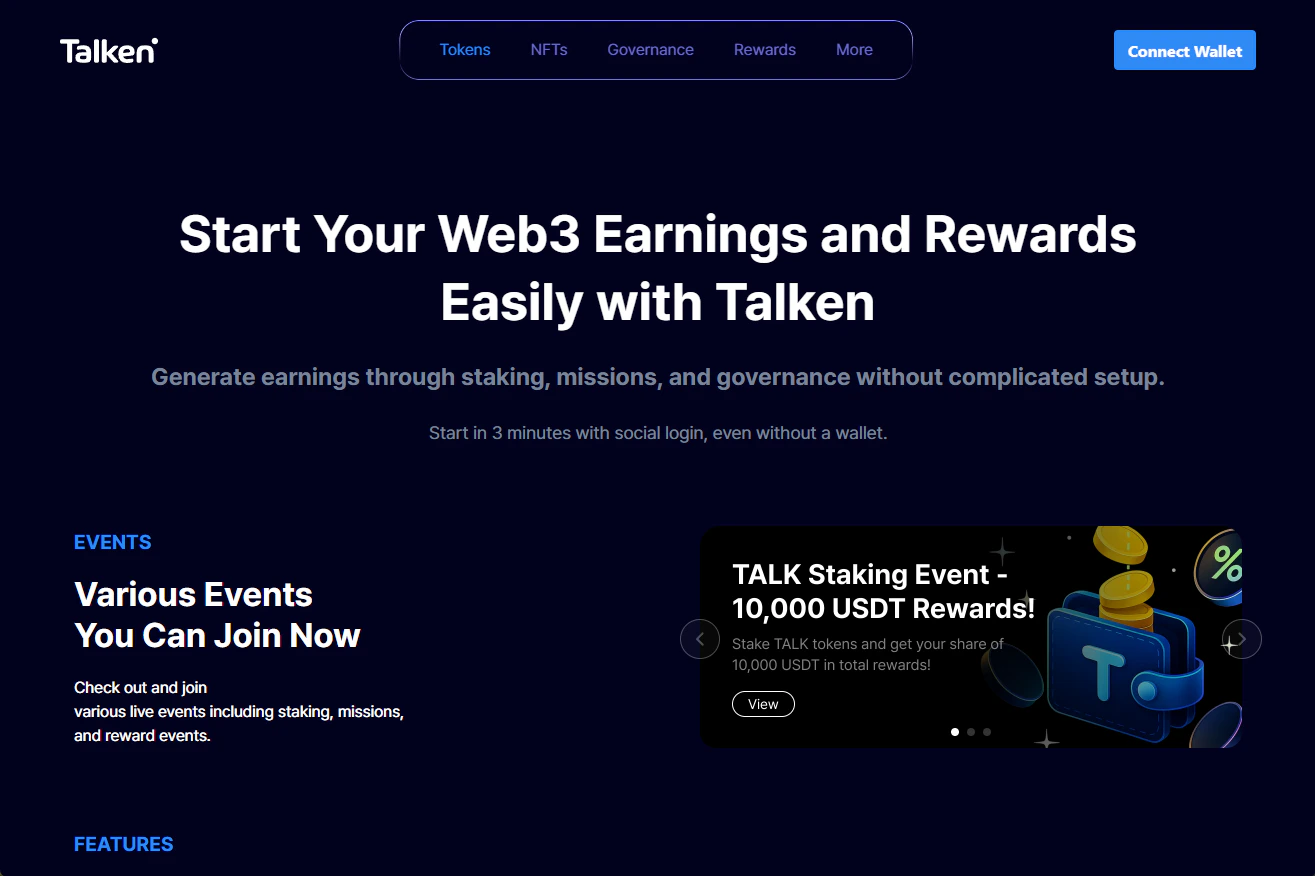
        Go to [https://wallet.talken.io](https://wallet.talken.io) and click **Connect Wallet**
        <Frame>
          <img src="https://mintcdn.com/talken-e05af0c7/Vpcn1MsszMNThnNV/images/img_038_spaces_FR642xWInD8MXH1pSGJk_up.png?fit=max&auto=format&n=Vpcn1MsszMNThnNV&q=85&s=0e5381b68407f57ac5cbbda54dca9899" alt="" width="1315" height="876" data-path="images/img_038_spaces_FR642xWInD8MXH1pSGJk_up.png" />
        </Frame>
      </Step>

      <Step title="Select Login Method">
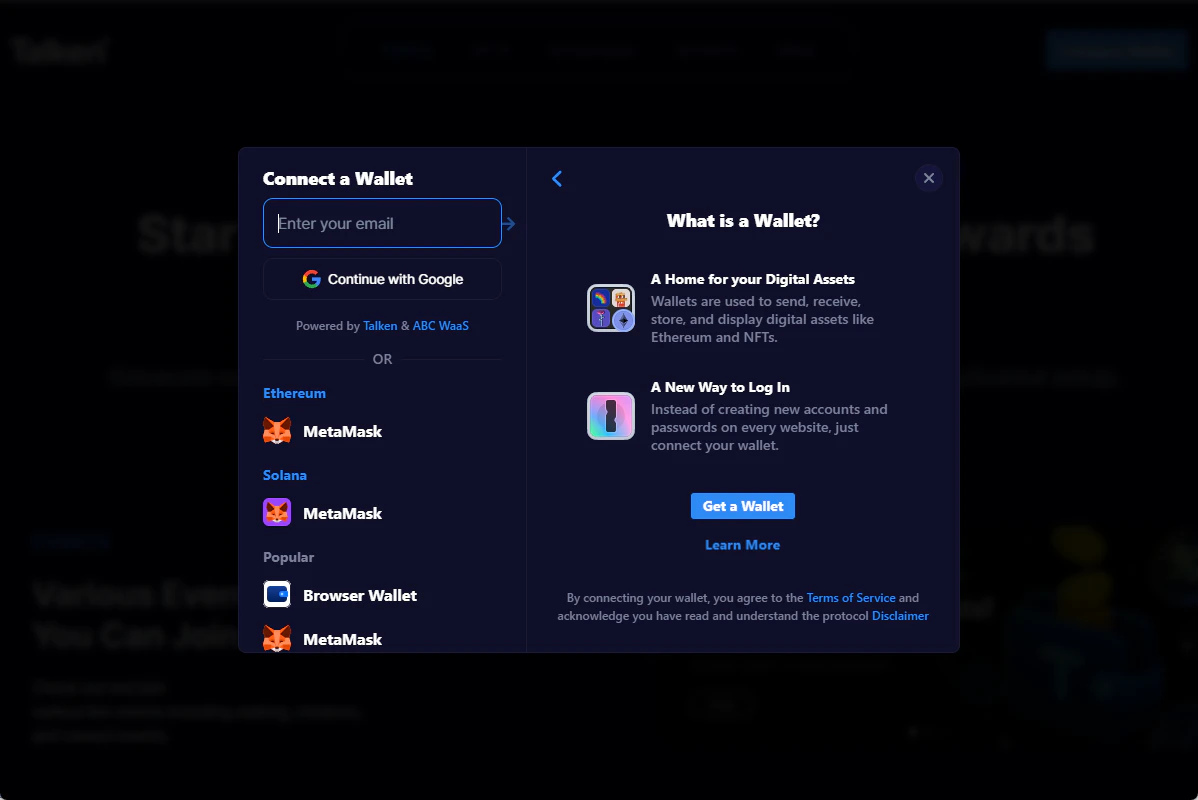
        Choose from Email, SNS (Google), or External Wallet connection.
        <Frame>
          <img src="https://mintcdn.com/talken-e05af0c7/Vpcn1MsszMNThnNV/images/img_039_spaces_FR642xWInD8MXH1pSGJk_up.png?fit=max&auto=format&n=Vpcn1MsszMNThnNV&q=85&s=9940a42516cc65aaf01121e62c023923" alt="" width="1198" height="800" data-path="images/img_039_spaces_FR642xWInD8MXH1pSGJk_up.png" />
        </Frame>
      </Step>

      <Step title="Email Verification">
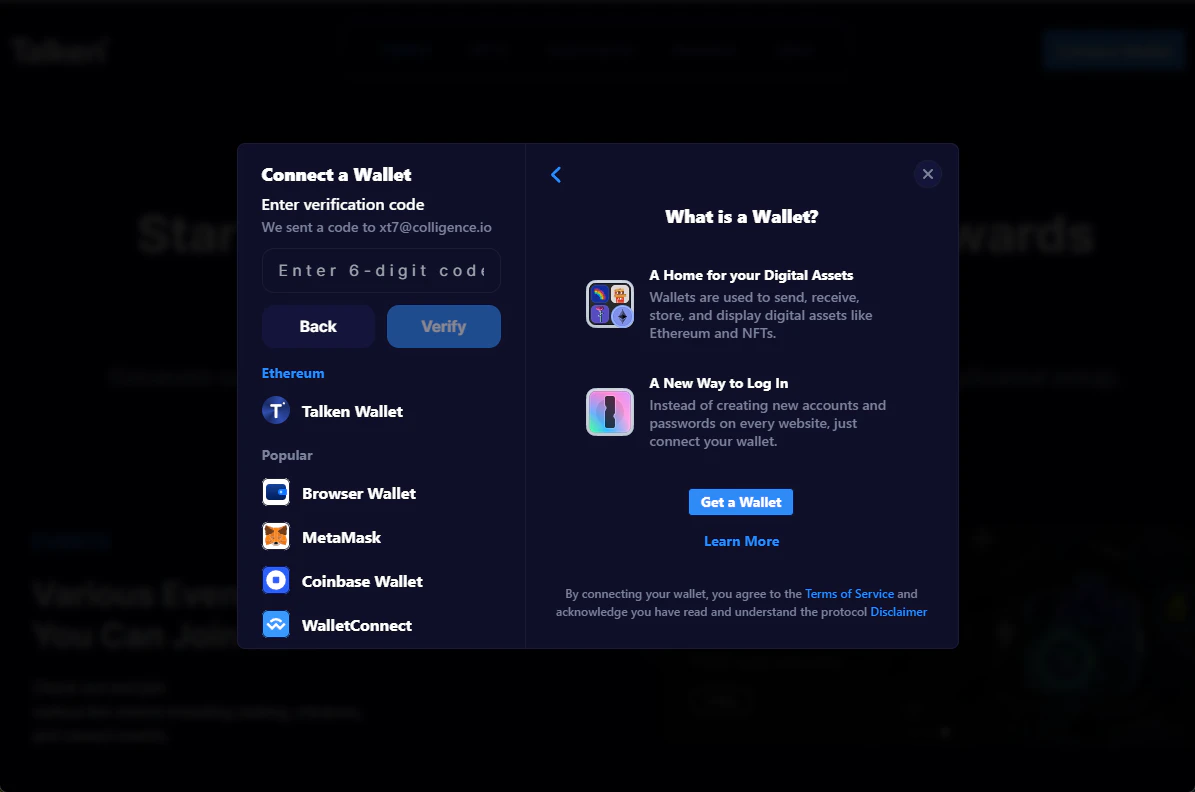
        Enter your email address and input the verification code sent to your email.
        <Frame>
          <img src="https://mintcdn.com/talken-e05af0c7/Vpcn1MsszMNThnNV/images/img_040_spaces_FR642xWInD8MXH1pSGJk_up.png?fit=max&auto=format&n=Vpcn1MsszMNThnNV&q=85&s=01dc11fe952b91eaa55d2cccc495b3c6" alt="" width="1195" height="792" data-path="images/img_040_spaces_FR642xWInD8MXH1pSGJk_up.png" />
        </Frame>
      </Step>

      <Step title="Set Password">
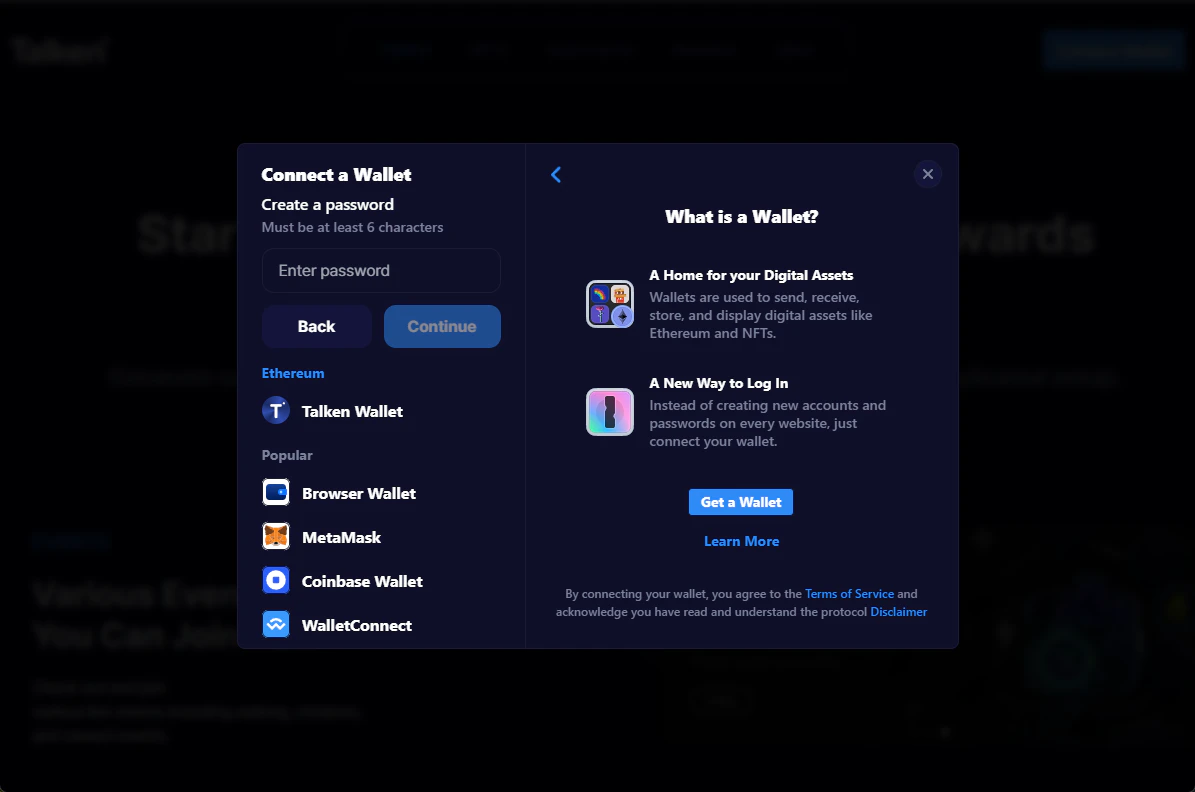
        Set your password and complete the sign-up process.
        <Frame>
          <img src="https://mintcdn.com/talken-e05af0c7/Vpcn1MsszMNThnNV/images/img_041_spaces_FR642xWInD8MXH1pSGJk_up.png?fit=max&auto=format&n=Vpcn1MsszMNThnNV&q=85&s=278eed227c765bd485f9f42e7621eb3e" alt="" width="1195" height="792" data-path="images/img_041_spaces_FR642xWInD8MXH1pSGJk_up.png" />
        </Frame>
      </Step>

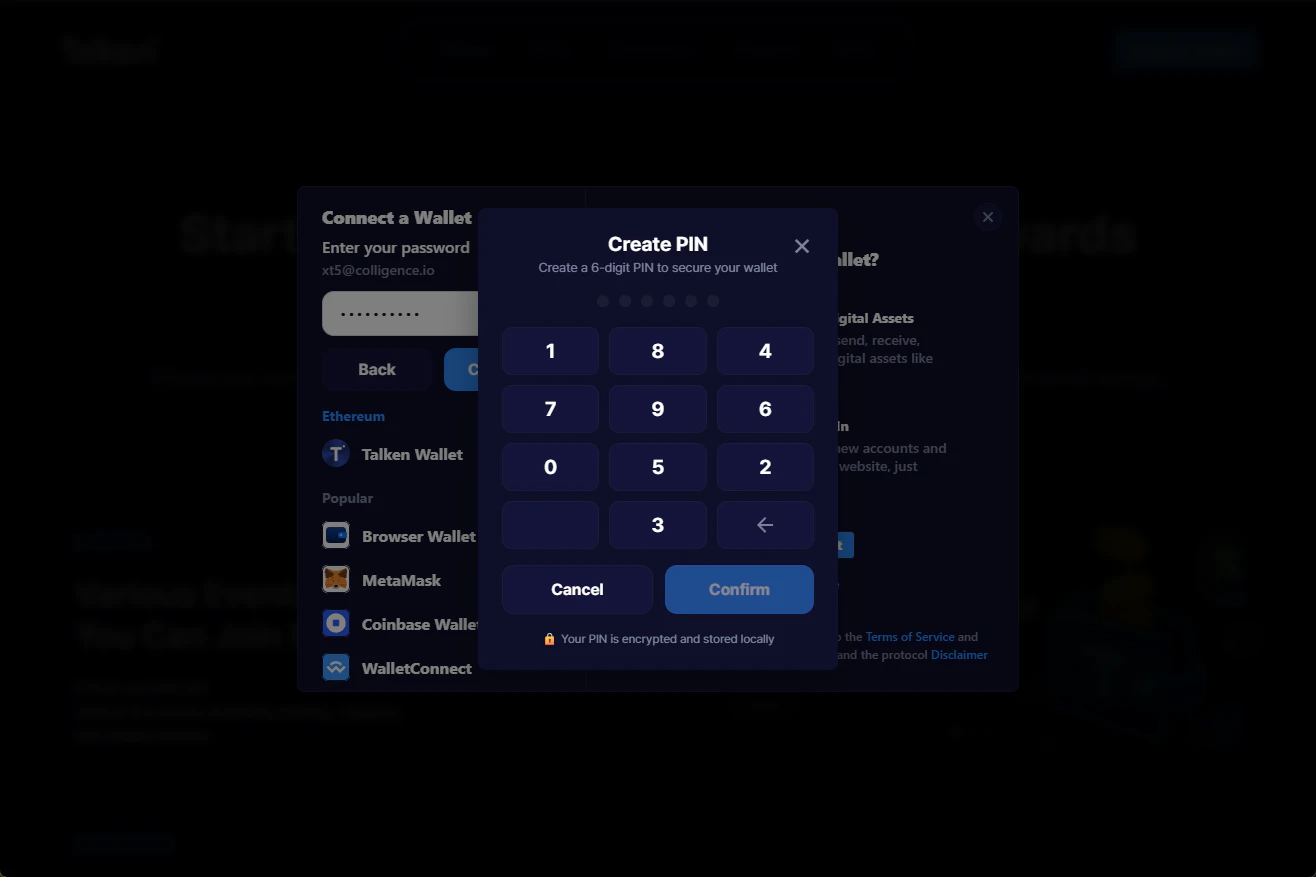
      <Step title="Set Your PIN">
        Set a 6-digit PIN to use for transactions and signing.
        <Frame>
          <img src="https://mintcdn.com/talken-e05af0c7/Vpcn1MsszMNThnNV/images/img_042_spaces_FR642xWInD8MXH1pSGJk_up.png?fit=max&auto=format&n=Vpcn1MsszMNThnNV&q=85&s=4416bb3180899425458c33c2f5e636c3" alt="" width="1316" height="877" data-path="images/img_042_spaces_FR642xWInD8MXH1pSGJk_up.png" />
        </Frame>
      </Step>

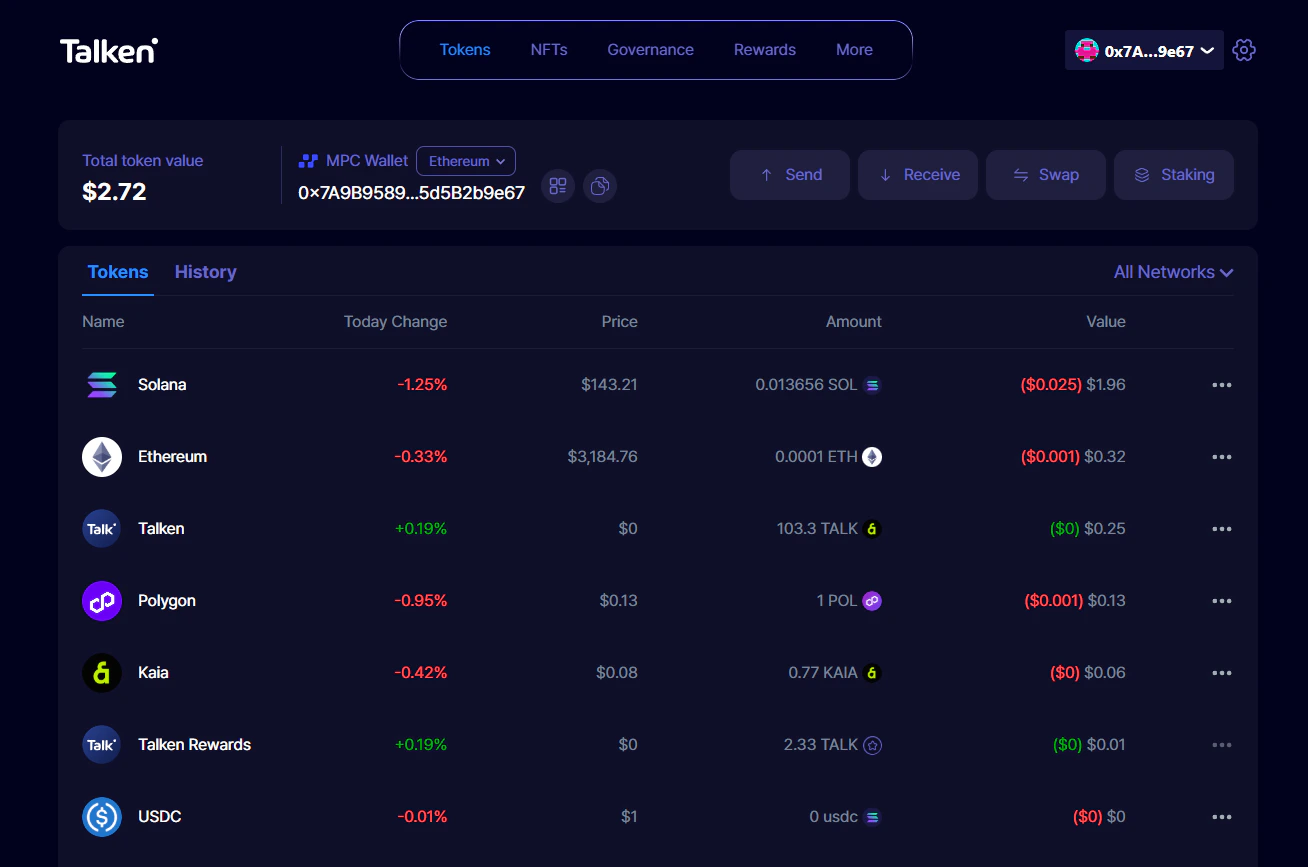
      <Step title="Done">
        Sign-up complete! You can find your account and UID in \[More], and your wallet address in \[⚙️ Settings].
        <Frame>
          <img src="https://mintcdn.com/talken-e05af0c7/Vpcn1MsszMNThnNV/images/img_043_spaces_FR642xWInD8MXH1pSGJk_up.png?fit=max&auto=format&n=Vpcn1MsszMNThnNV&q=85&s=b45f08ed724144318e1962f0a7b1cc8f" alt="" width="1308" height="867" data-path="images/img_043_spaces_FR642xWInD8MXH1pSGJk_up.png" />
        </Frame>
      </Step>
    </Steps>
  </Tab>

  <Tab title="Telegram">
    <Steps>
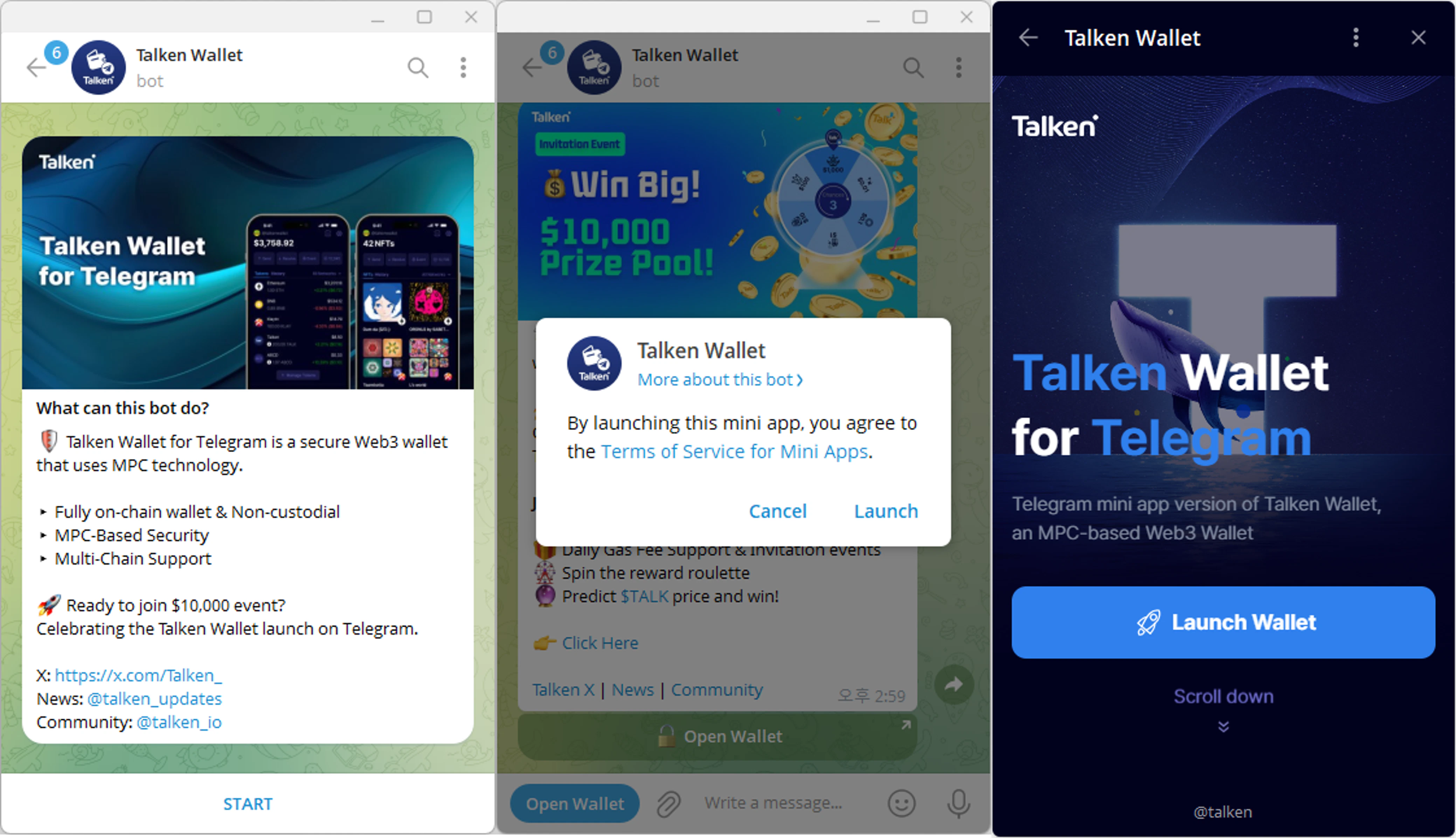
      <Step title="Start on Telegram">
        Go to [https://t.me/talken](https://t.me/talken) and click **Start → Open Wallet → Launch Wallet**
        <Frame>
          <img src="https://mintcdn.com/talken-e05af0c7/Vpcn1MsszMNThnNV/images/img_044_spaces_FR642xWInD8MXH1pSGJk_up.png?fit=max&auto=format&n=Vpcn1MsszMNThnNV&q=85&s=d9c4b7b42a2aa82398d82c5939704f0f" alt="" width="4158" height="2393" data-path="images/img_044_spaces_FR642xWInD8MXH1pSGJk_up.png" />
        </Frame>
      </Step>

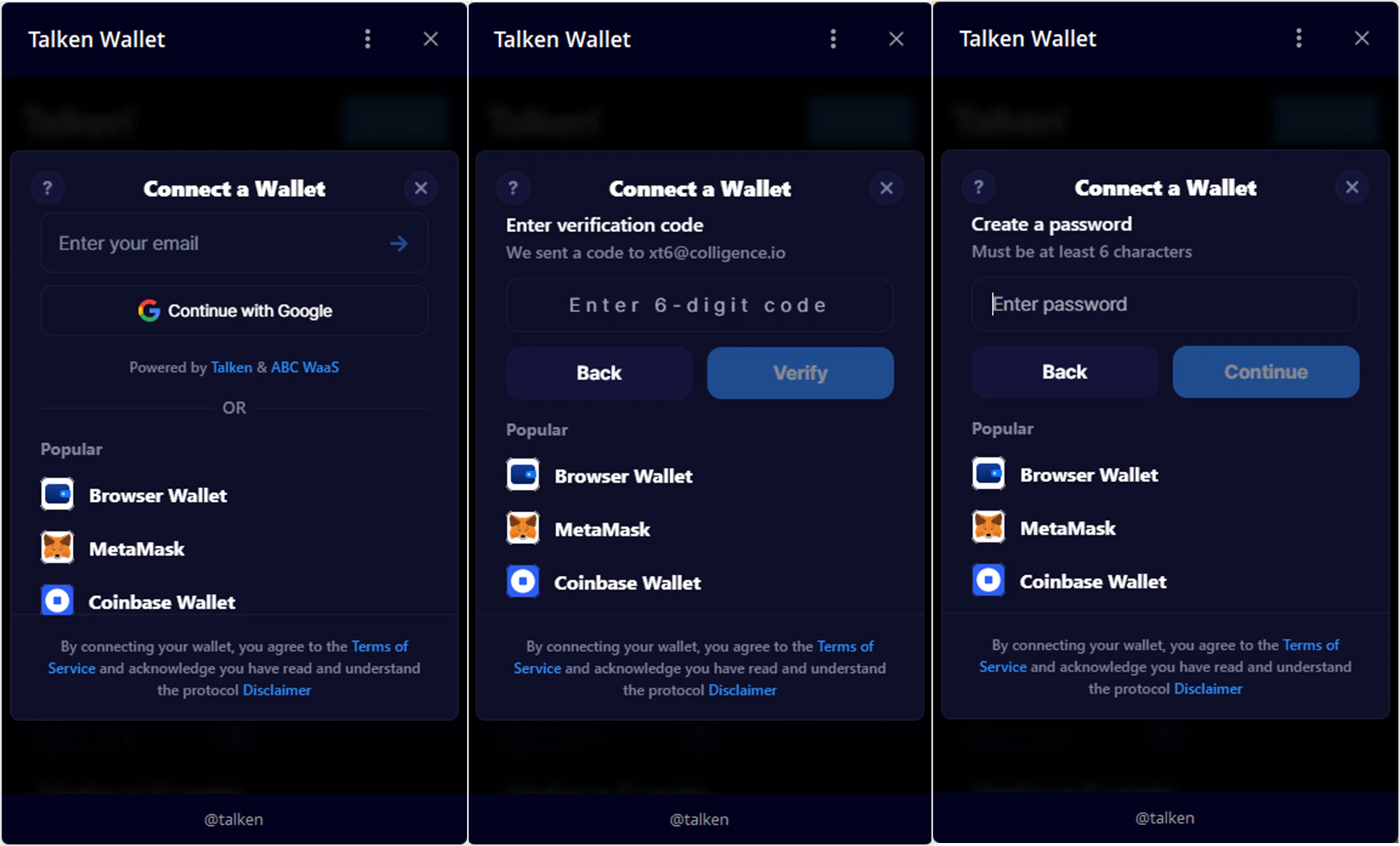
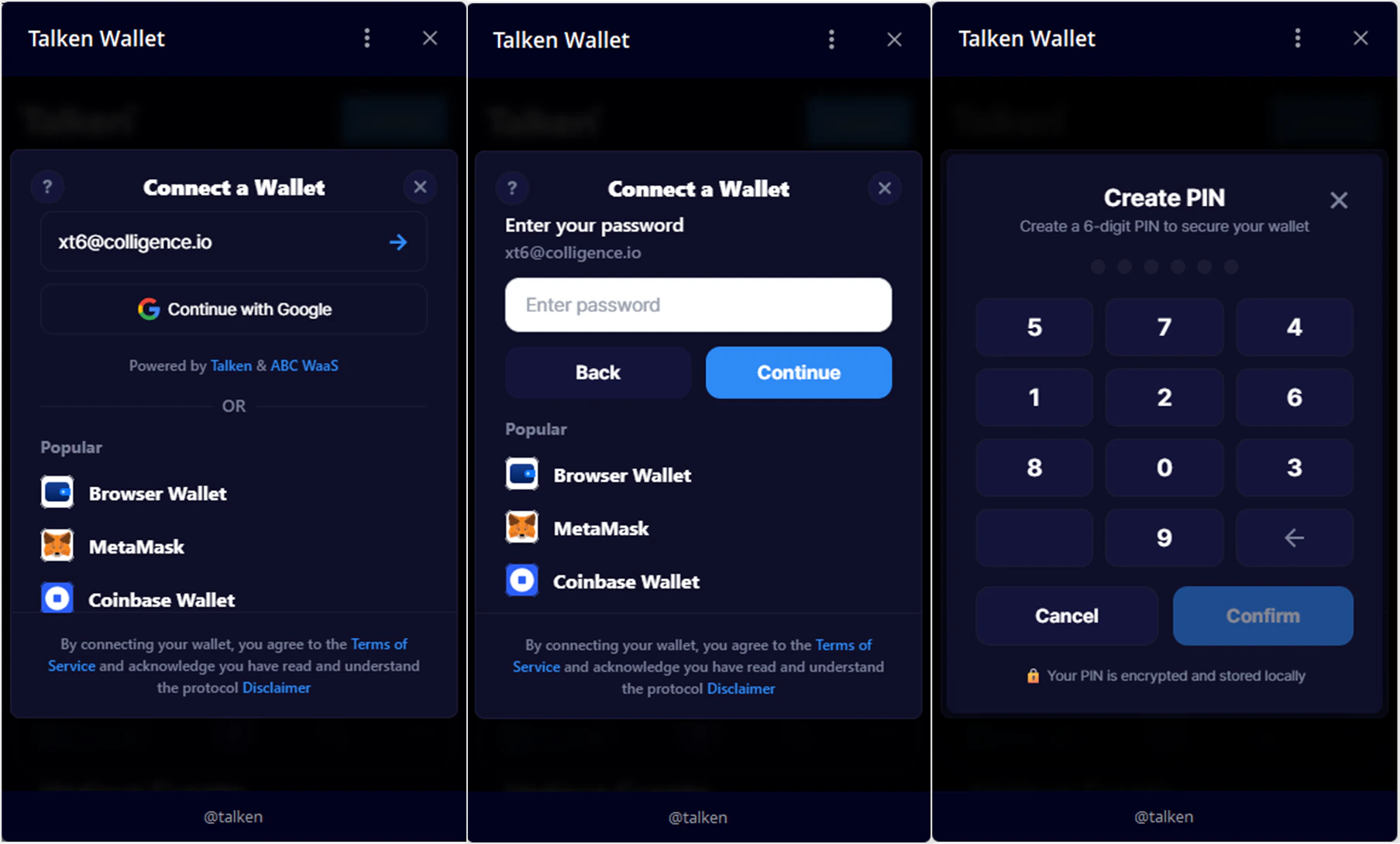
      <Step title="Sign Up">
        Complete sign-up by verifying your email and setting a password.
        <Frame>
          <img src="https://mintcdn.com/talken-e05af0c7/Vpcn1MsszMNThnNV/images/img_045_spaces_FR642xWInD8MXH1pSGJk_up.png?fit=max&auto=format&n=Vpcn1MsszMNThnNV&q=85&s=91eb8676b02f3d4912616d8d7b5ada41" alt="" width="1804" height="1090" data-path="images/img_045_spaces_FR642xWInD8MXH1pSGJk_up.png" />
        </Frame>
      </Step>

      <Step title="Set Your PIN">
        Set a 6-digit PIN to use for transactions and signing.
        <Frame>
          <img src="https://mintcdn.com/talken-e05af0c7/Vpcn1MsszMNThnNV/images/img_046_spaces_FR642xWInD8MXH1pSGJk_up.png?fit=max&auto=format&n=Vpcn1MsszMNThnNV&q=85&s=01b796cd9acecdac0a5b6bf2226bb535" alt="" width="1807" height="1090" data-path="images/img_046_spaces_FR642xWInD8MXH1pSGJk_up.png" />
        </Frame>
      </Step>

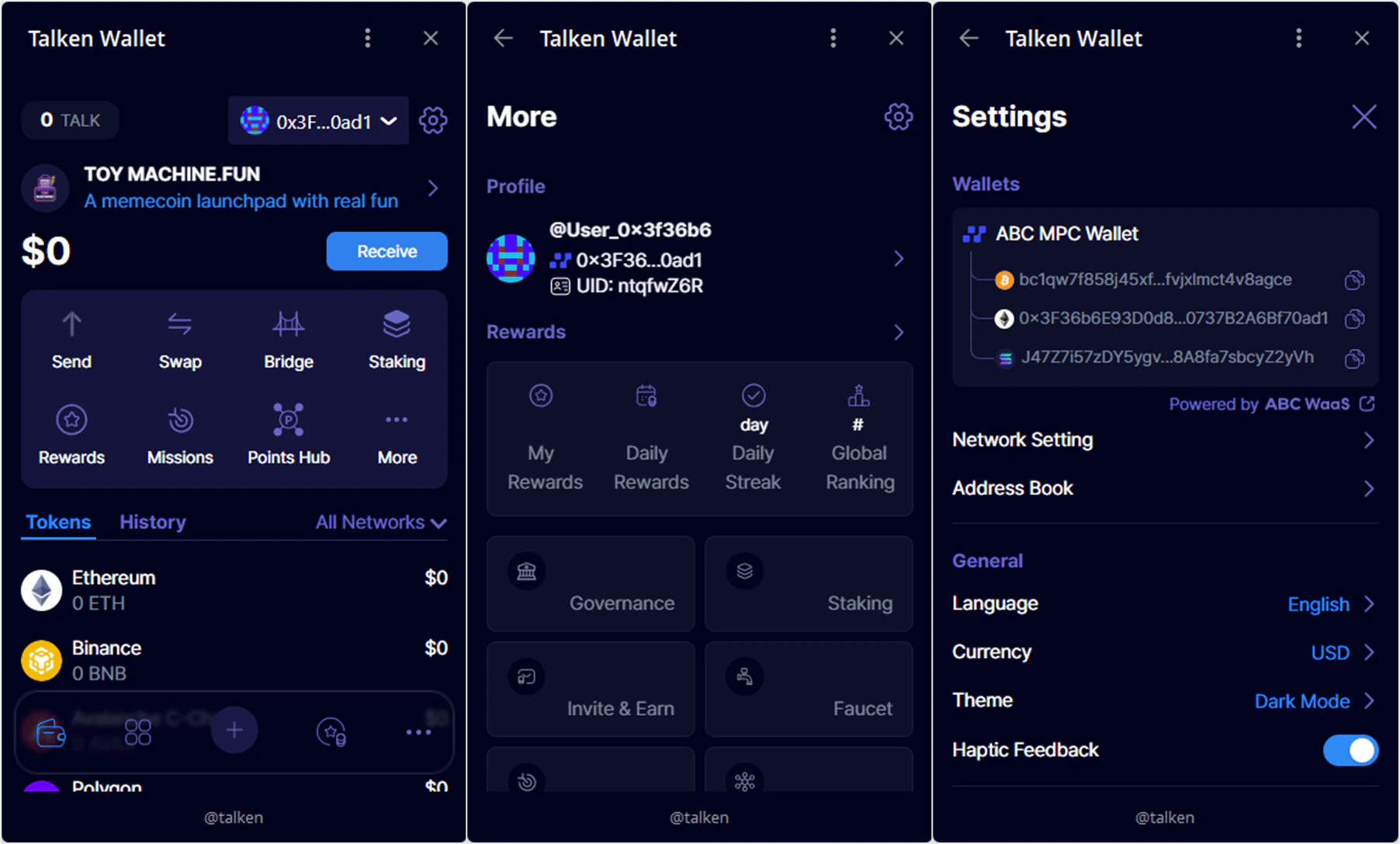
      <Step title="Done">
        Sign-up complete! You can find your account and UID in \[More], and your wallet address in \[⚙️ Settings].
        <Frame>
          <img src="https://mintcdn.com/talken-e05af0c7/Vpcn1MsszMNThnNV/images/img_047_spaces_FR642xWInD8MXH1pSGJk_up.png?fit=max&auto=format&n=Vpcn1MsszMNThnNV&q=85&s=0f47bb860d49286d28f287b729dcedab" alt="" width="1804" height="1088" data-path="images/img_047_spaces_FR642xWInD8MXH1pSGJk_up.png" />
        </Frame>
      </Step>
    </Steps>
  </Tab>
</Tabs>

***

## Sign Up with External Wallet (Web Only)

If you already use MetaMask, Phantom, or other external wallets, you can sign up by connecting your wallet directly or via WalletConnect.

<Steps>
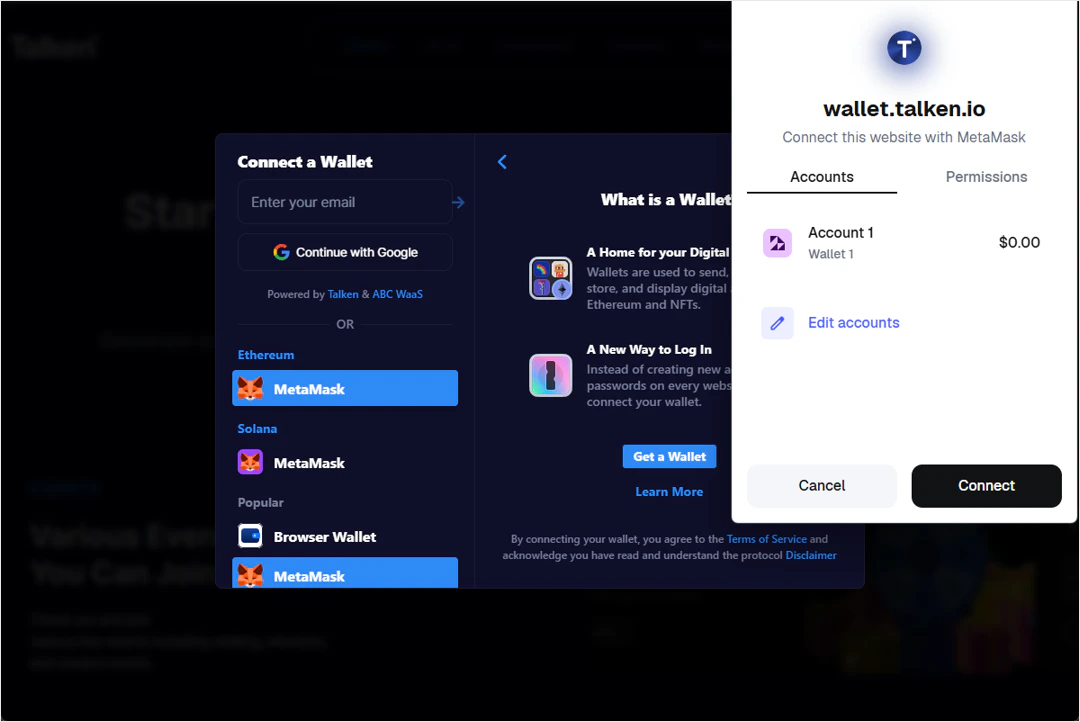
  <Step title="Select Wallet">
    Click on the wallet you want to connect (e.g., MetaMask) on the login screen.
    <Frame>
      <img src="https://mintcdn.com/talken-e05af0c7/J4kJtqDGvRXWnYDx/images/img_048_spaces_FR642xWInD8MXH1pSGJk_up.png?fit=max&auto=format&n=J4kJtqDGvRXWnYDx&q=85&s=ae52a70dcebae4933b5fef1487ea924c" alt="" width="1080" height="722" data-path="images/img_048_spaces_FR642xWInD8MXH1pSGJk_up.png" />
    </Frame>
  </Step>

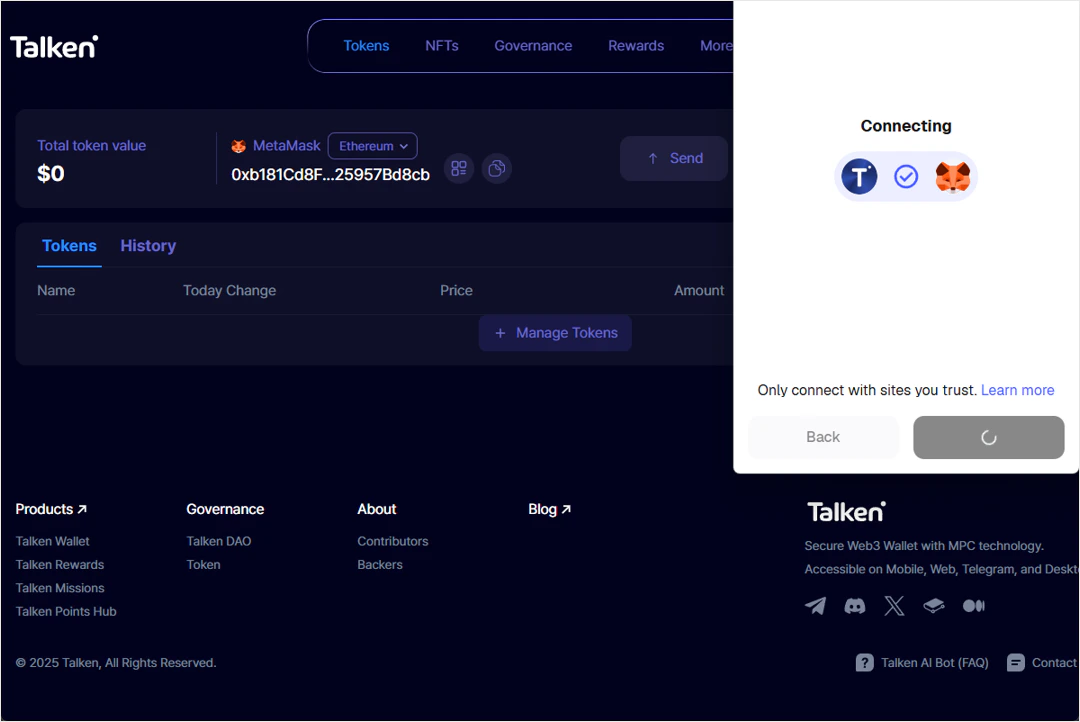
  <Step title="Connect and Done">
    Approve the wallet connection to complete sign-up.
    <Frame>
      <img src="https://mintcdn.com/talken-e05af0c7/J4kJtqDGvRXWnYDx/images/img_049_spaces_FR642xWInD8MXH1pSGJk_up.png?fit=max&auto=format&n=J4kJtqDGvRXWnYDx&q=85&s=15d40089f2bf74e3ea6a7d2af2256d42" alt="" width="1080" height="722" data-path="images/img_049_spaces_FR642xWInD8MXH1pSGJk_up.png" />
    </Frame>
  </Step>
</Steps>
