> ## Documentation Index
> Fetch the complete documentation index at: https://docs.talken.io/llms.txt
> Use this file to discover all available pages before exploring further.

# How to Recover Mobile Wallet

To recover an existing wallet, follow the guide below.

## Download App

<div className="download-links">
  <a className="download-link" href="https://apps.apple.com/kr/app/talken-multi-chain-nft-wallet/id1459475831?l=en" target="_blank">
    <img src="https://mintcdn.com/talken-e05af0c7/5W-aETqbZL7Rb3FL/images/apple-icon.svg?fit=max&auto=format&n=5W-aETqbZL7Rb3FL&q=85&s=b46b81fb708db15b3f0f2fc3b4ed6767" alt="iOS" width="24" height="24" data-path="images/apple-icon.svg" />

    <div className="download-link-text">
      <span className="download-link-title">iOS</span>
      <span className="download-link-desc">Download from App Store</span>
    </div>

    <span className="download-link-arrow">›</span>
  </a>

  <a className="download-link" href="https://play.google.com/store/apps/details?id=io.talken.wallet" target="_blank">
    <img src="https://mintcdn.com/talken-e05af0c7/5W-aETqbZL7Rb3FL/images/google-play-icon.svg?fit=max&auto=format&n=5W-aETqbZL7Rb3FL&q=85&s=712204bf72f22a7d36a60eff33097479" alt="Android" width="24" height="24" data-path="images/google-play-icon.svg" />

    <div className="download-link-text">
      <span className="download-link-title">Android</span>
      <span className="download-link-desc">Download from Google Play</span>
    </div>

    <span className="download-link-arrow">›</span>
  </a>
</div>

***

## How to Recover Wallet

<Tabs>
  <Tab title="Recover with Document">
    Recover using a previously issued Talken recovery document.

    <Warning>
      The recovery document issuance service has been discontinued. You can only use this method if you have a previously issued recovery document.
    </Warning>

    <Note>
      You must be logged in to the Talken account that created the wallet with the recovery document to use this option.
    </Note>

    <Steps>
      <Step title="Start Wallet Recovery">
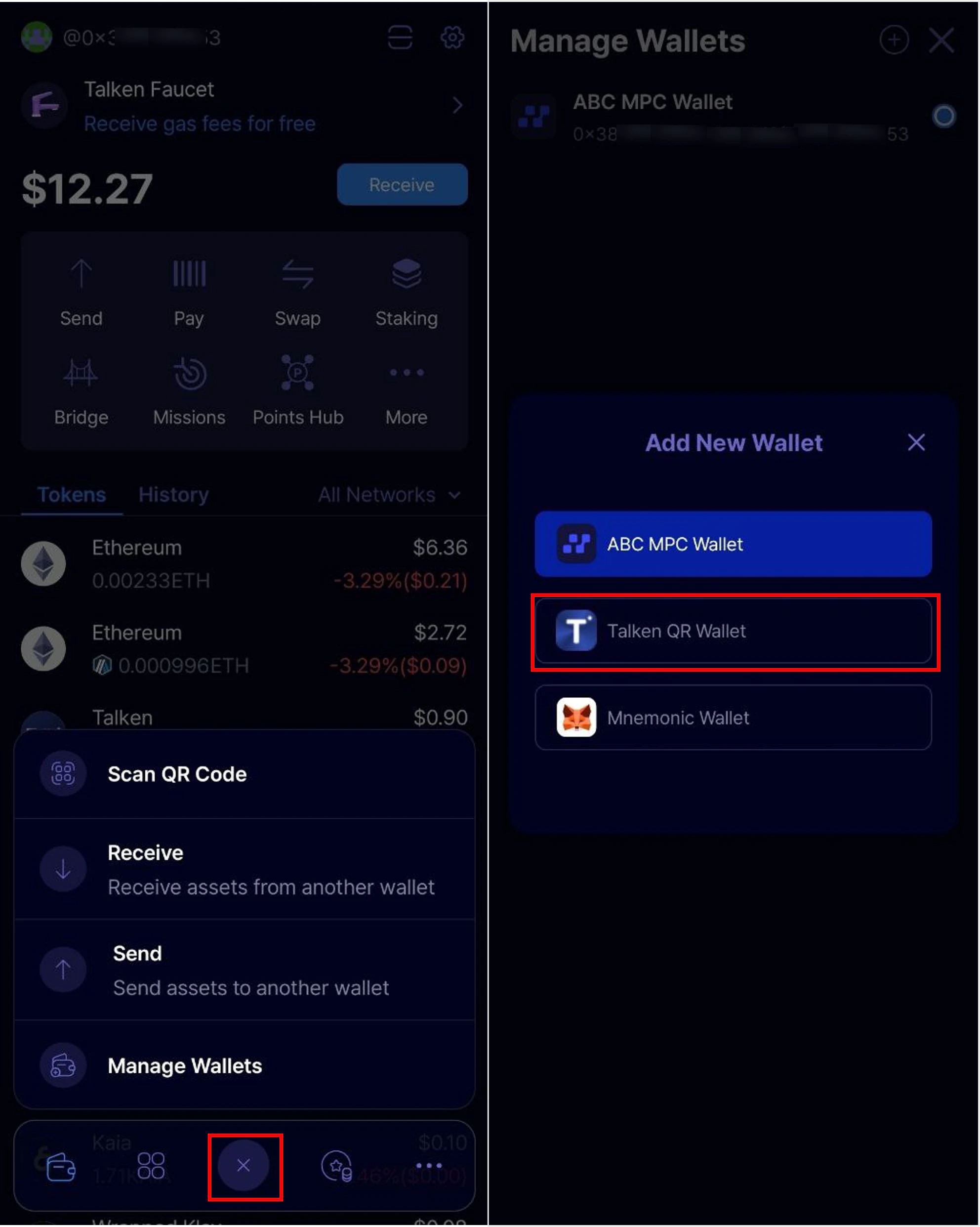
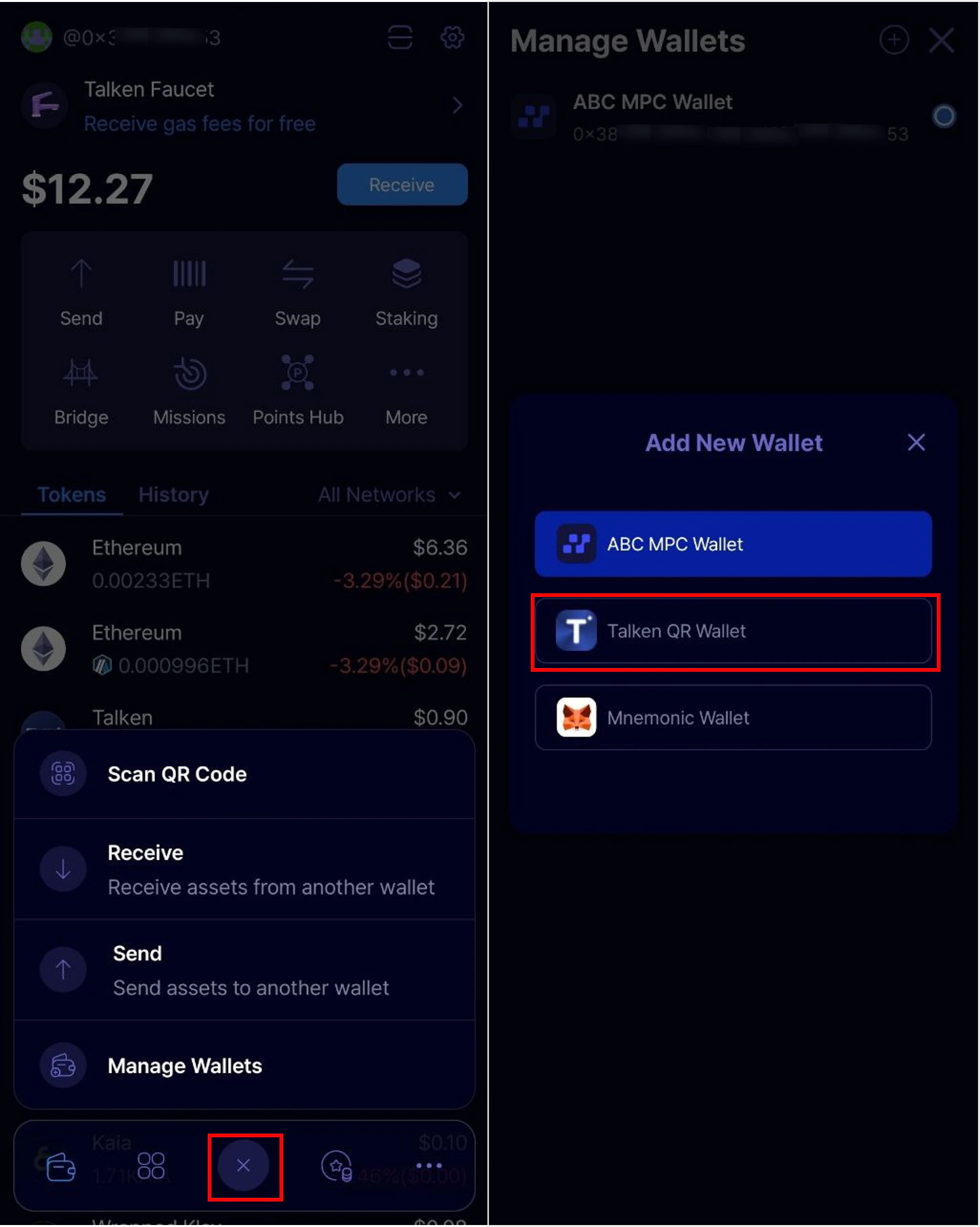
        Tap the '+' button at the bottom center of the app main page, then select **'Talken QR Wallet'**.

        <Frame>
          <img style={{maxWidth: '500px'}} src="https://mintcdn.com/talken-e05af0c7/qhdJqMcewoB2P5bb/images/%EA%B7%B8%EB%A6%BC3.png?fit=max&auto=format&n=qhdJqMcewoB2P5bb&q=85&s=d651882539a4c37257b753af2fc6b109" className="dark:hidden" width="1984" height="2483" data-path="images/그림3.png" />

          <img style={{maxWidth: '500px'}} src="https://mintcdn.com/talken-e05af0c7/qhdJqMcewoB2P5bb/images/%EA%B7%B8%EB%A6%BC3-1.png?fit=max&auto=format&n=qhdJqMcewoB2P5bb&q=85&s=cdd50c71138b8c2e475194932da9f641" className="hidden dark:block" width="1984" height="2483" data-path="images/그림3-1.png" />
        </Frame>
      </Step>

      <Step title="Scan the Recovery Code & Enter Recovery Password" stepNumber={2}>
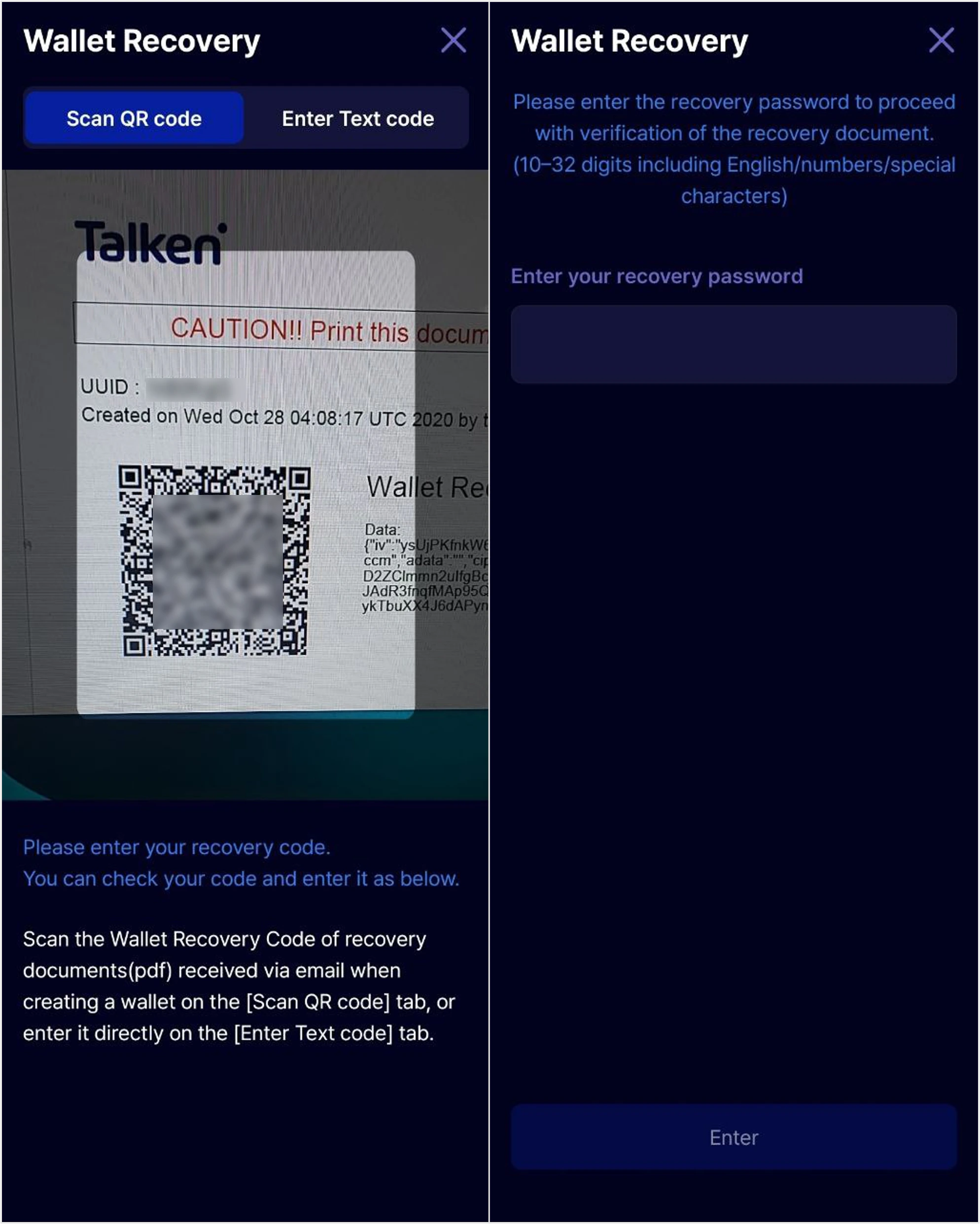
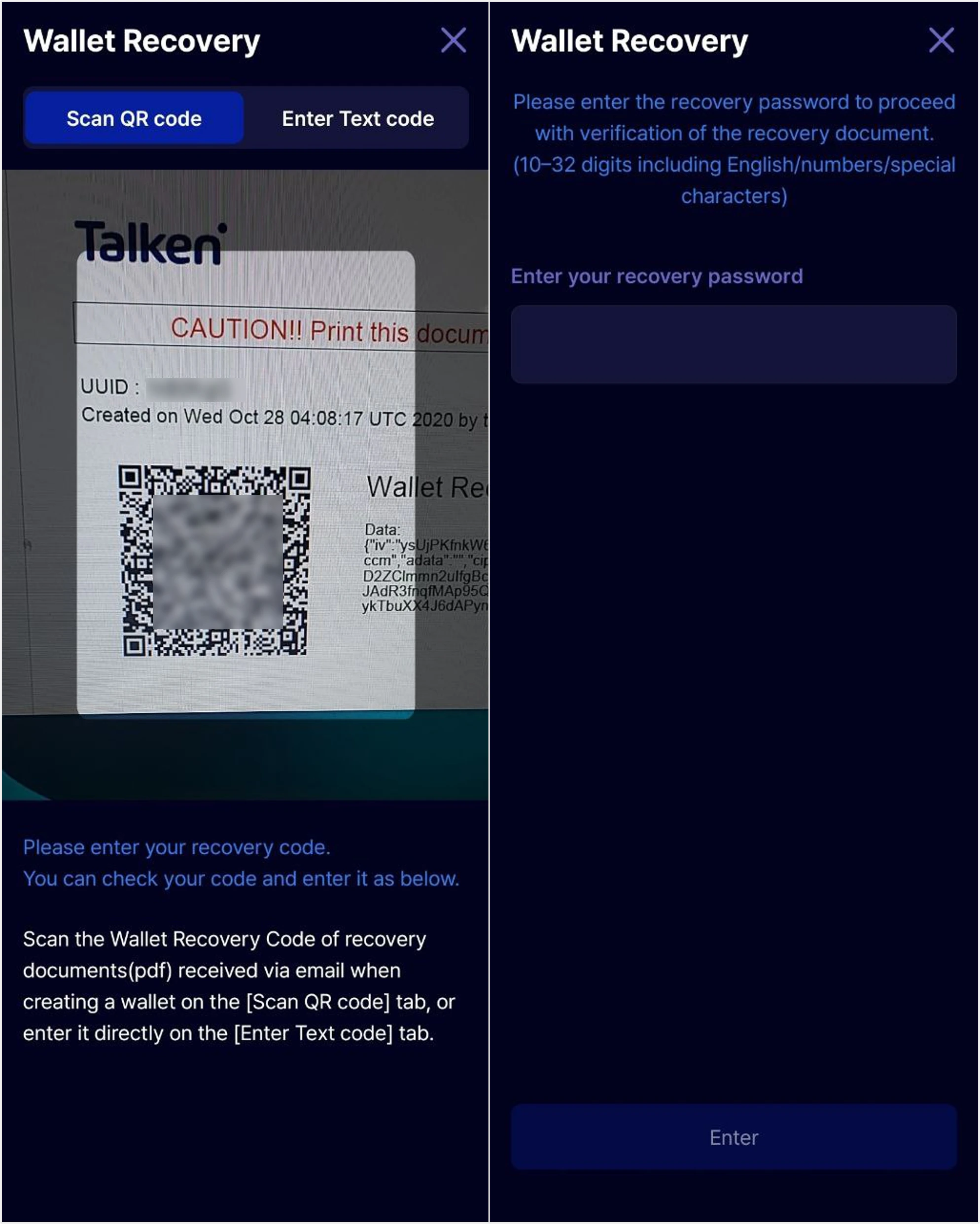
        Scan the wallet recovery QR code on your recovery document, then enter your recovery password. Once you enter the correct password, your wallet recovery will be complete.

        <Frame>
          <img style={{maxWidth: '500px'}} src="https://mintcdn.com/talken-e05af0c7/qhdJqMcewoB2P5bb/images/%EA%B7%B8%EB%A6%BC5.png?fit=max&auto=format&n=qhdJqMcewoB2P5bb&q=85&s=a9cffafdedb3922ca44361950f0d9099" className="dark:hidden" width="1988" height="2483" data-path="images/그림5.png" />

          <img style={{maxWidth: '500px'}} src="https://mintcdn.com/talken-e05af0c7/qhdJqMcewoB2P5bb/images/%EA%B7%B8%EB%A6%BC5-1.png?fit=max&auto=format&n=qhdJqMcewoB2P5bb&q=85&s=9fc047caeabe46aaaf44466cd7c37910" className="hidden dark:block" width="1988" height="2483" data-path="images/그림5-1.png" />
        </Frame>

        <Note>
          Note\
          . The recovery code is attached to the verification email you received when creating your wallet.\
          . The recovery password must be 10–32 characters, including letters, numbers, and special characters.
        </Note>
      </Step>

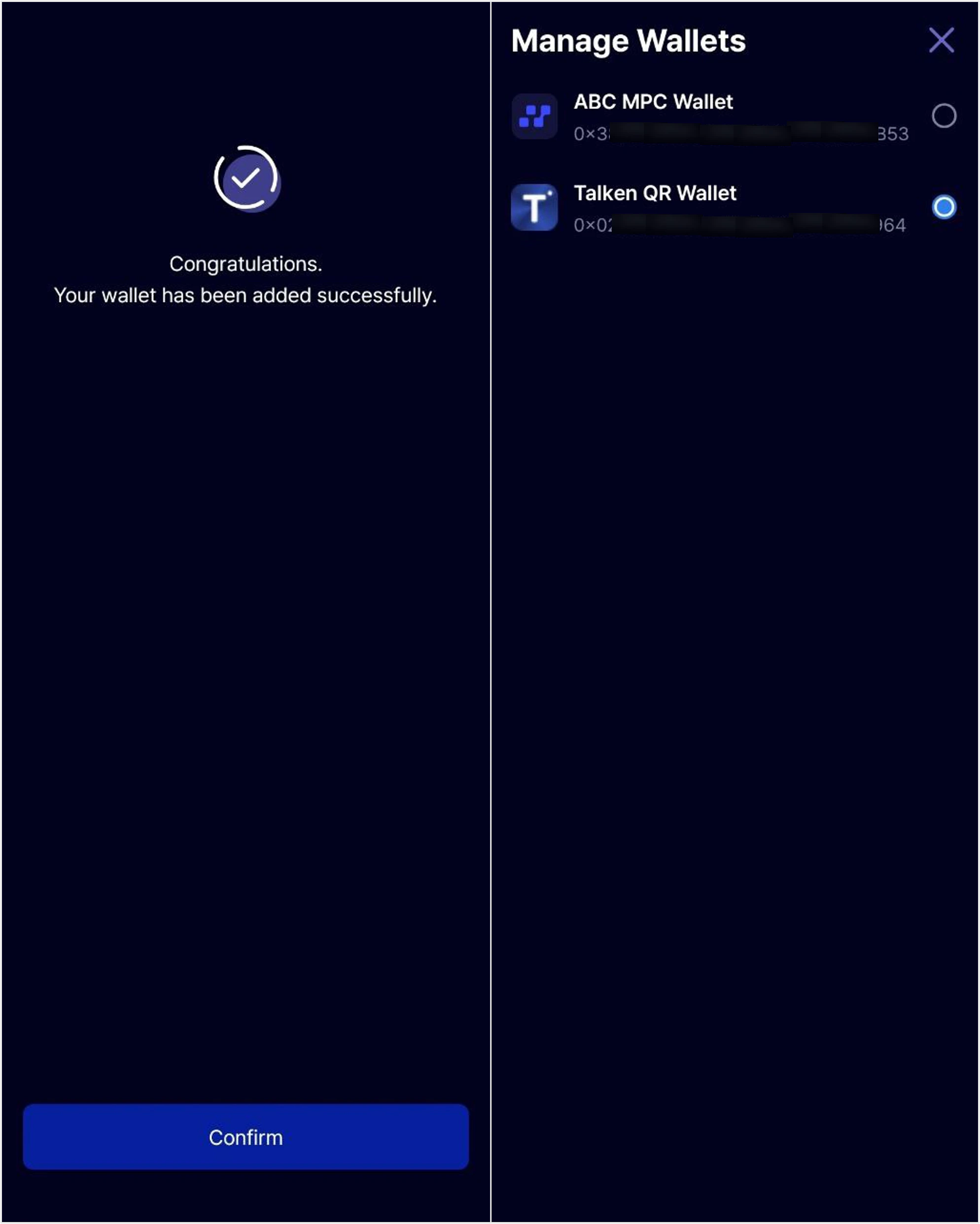
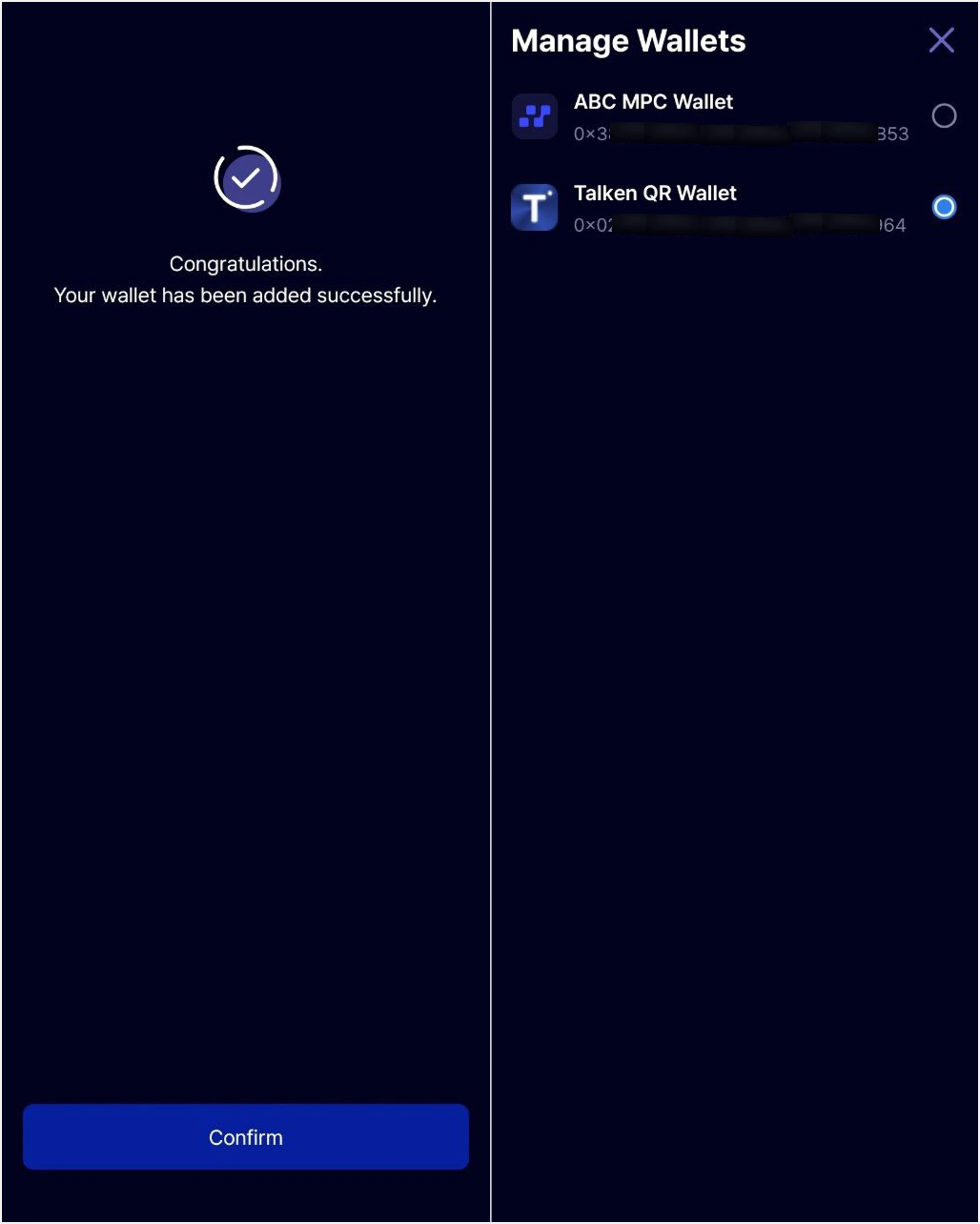
      <Step title="Recovery Complete" stepNumber={3}>
        Wallet recovery is complete. You can now use both **Talken QR Wallet** and **ABC MPC Wallet** through the 'Wallet Management' feature in the Talken app.

        <Frame>
          <img style={{maxWidth: '500px'}} src="https://mintcdn.com/talken-e05af0c7/qhdJqMcewoB2P5bb/images/%EA%B7%B8%EB%A6%BC6.png?fit=max&auto=format&n=qhdJqMcewoB2P5bb&q=85&s=30e72b912667a54c12bb7e2aa9520267" className="dark:hidden" width="1988" height="2483" data-path="images/그림6.png" />

          <img style={{maxWidth: '500px'}} src="https://mintcdn.com/talken-e05af0c7/qhdJqMcewoB2P5bb/images/%EA%B7%B8%EB%A6%BC6-1.png?fit=max&auto=format&n=qhdJqMcewoB2P5bb&q=85&s=6b472f1f84e6d6ddffa3d4a8f76f0b14" className="hidden dark:block" width="1988" height="2483" data-path="images/그림6-1.png" />
        </Frame>
      </Step>
    </Steps>
  </Tab>

  <Tab title="Register & Recover with Mnemonic">
    Recover your wallet using a mnemonic phrase from Talken Wallet, or register a new wallet using a mnemonic phrase from an external wallet like MetaMask.

    <Steps>
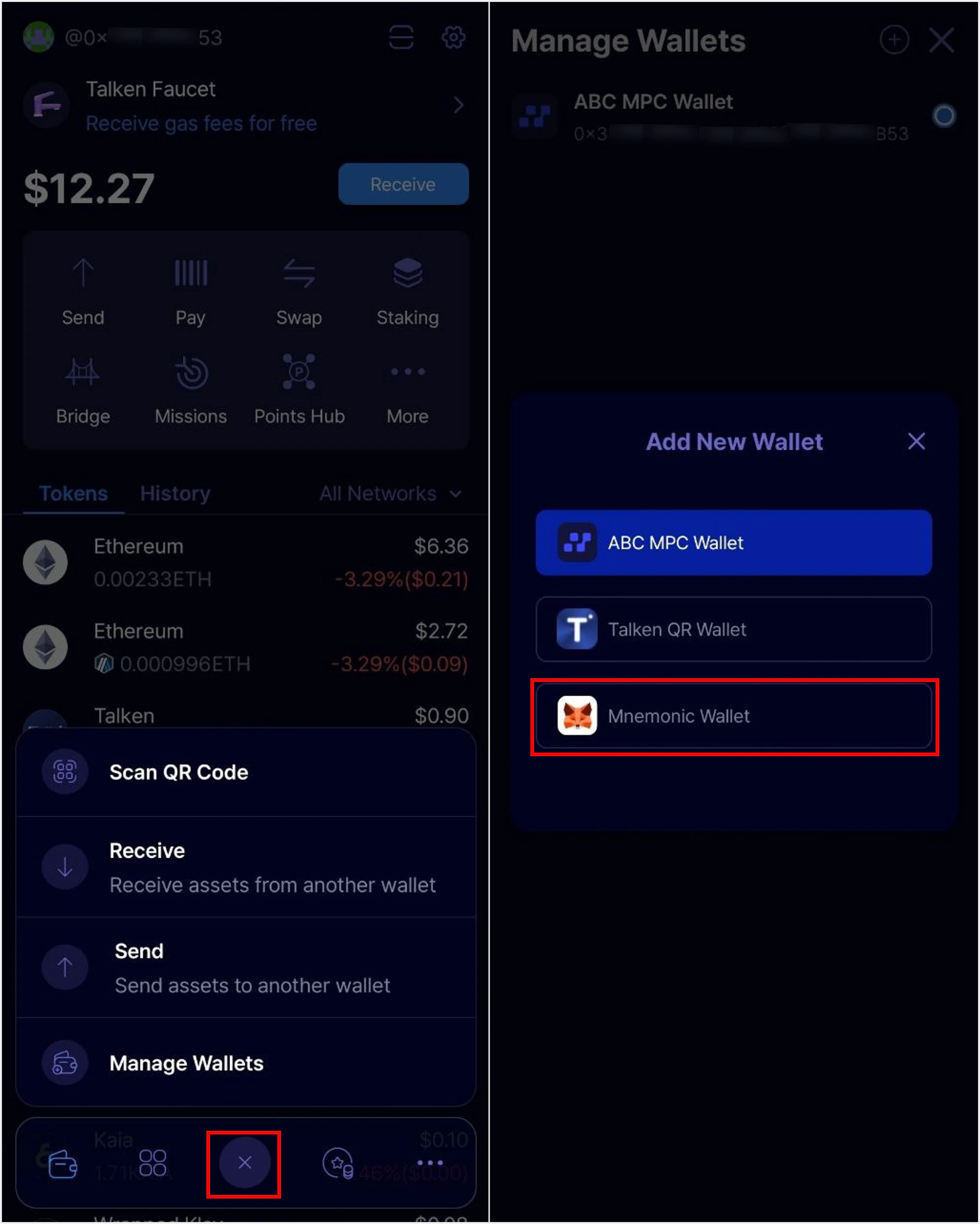
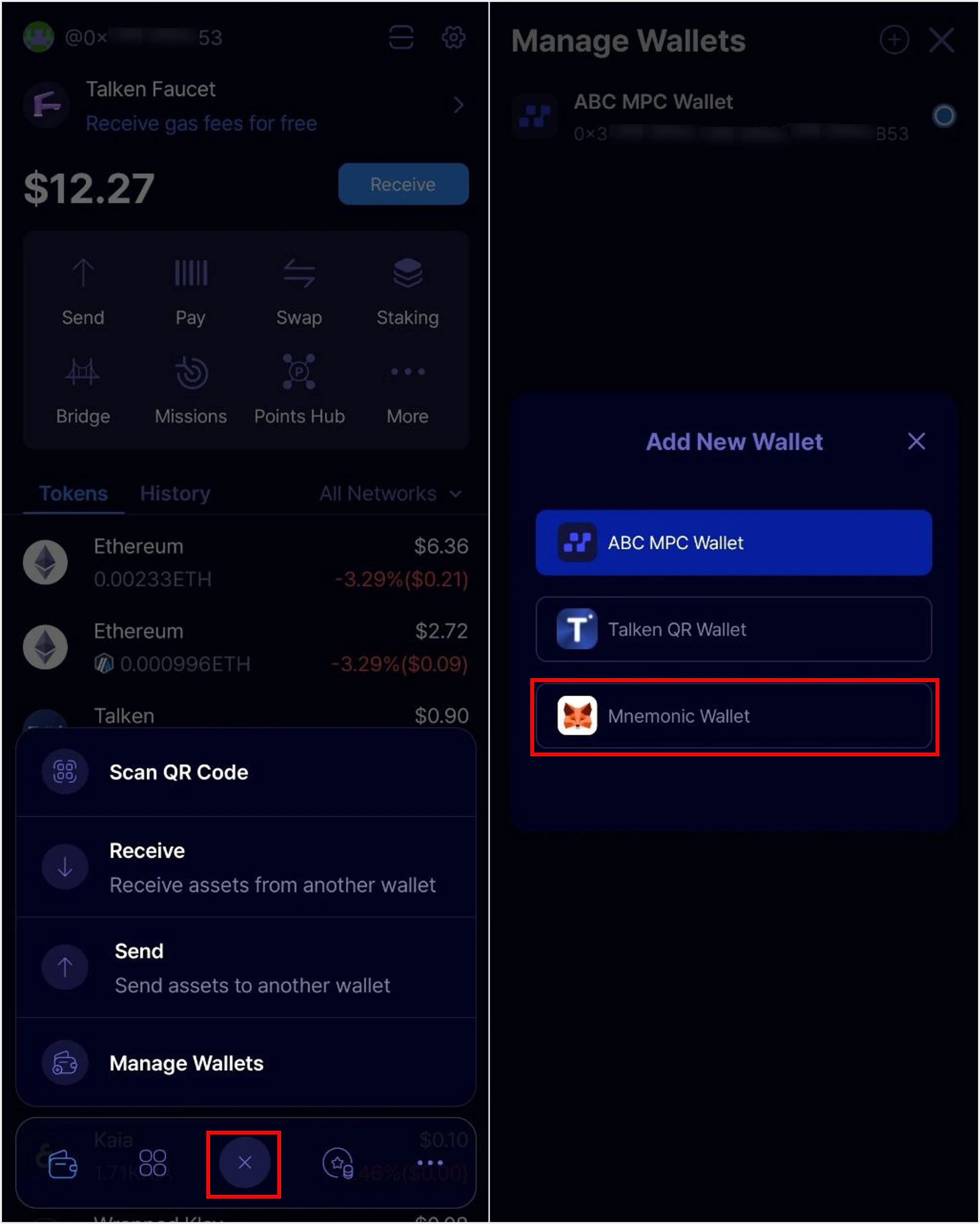
      <Step title="Start Wallet Registration/Recovery">
        Tap the '+' button at the bottom center of the app main page, then select **'Mnemonic Wallet'**.

        <Frame>
          <img style={{maxWidth: '500px'}} src="https://mintcdn.com/talken-e05af0c7/qhdJqMcewoB2P5bb/images/%EA%B7%B8%EB%A6%BC7.png?fit=max&auto=format&n=qhdJqMcewoB2P5bb&q=85&s=72a08caf48950cedb36840cfa05b70a2" className="dark:hidden" width="1988" height="2483" data-path="images/그림7.png" />

          <img style={{maxWidth: '500px'}} src="https://mintcdn.com/talken-e05af0c7/qhdJqMcewoB2P5bb/images/%EA%B7%B8%EB%A6%BC7-1.png?fit=max&auto=format&n=qhdJqMcewoB2P5bb&q=85&s=124b0532c25f0f1a2e898c3956c22764" className="hidden dark:block" width="1988" height="2483" data-path="images/그림7-1.png" />
        </Frame>
      </Step>

      <Step title="Enter Mnemonic Phrase" stepNumber={2}>
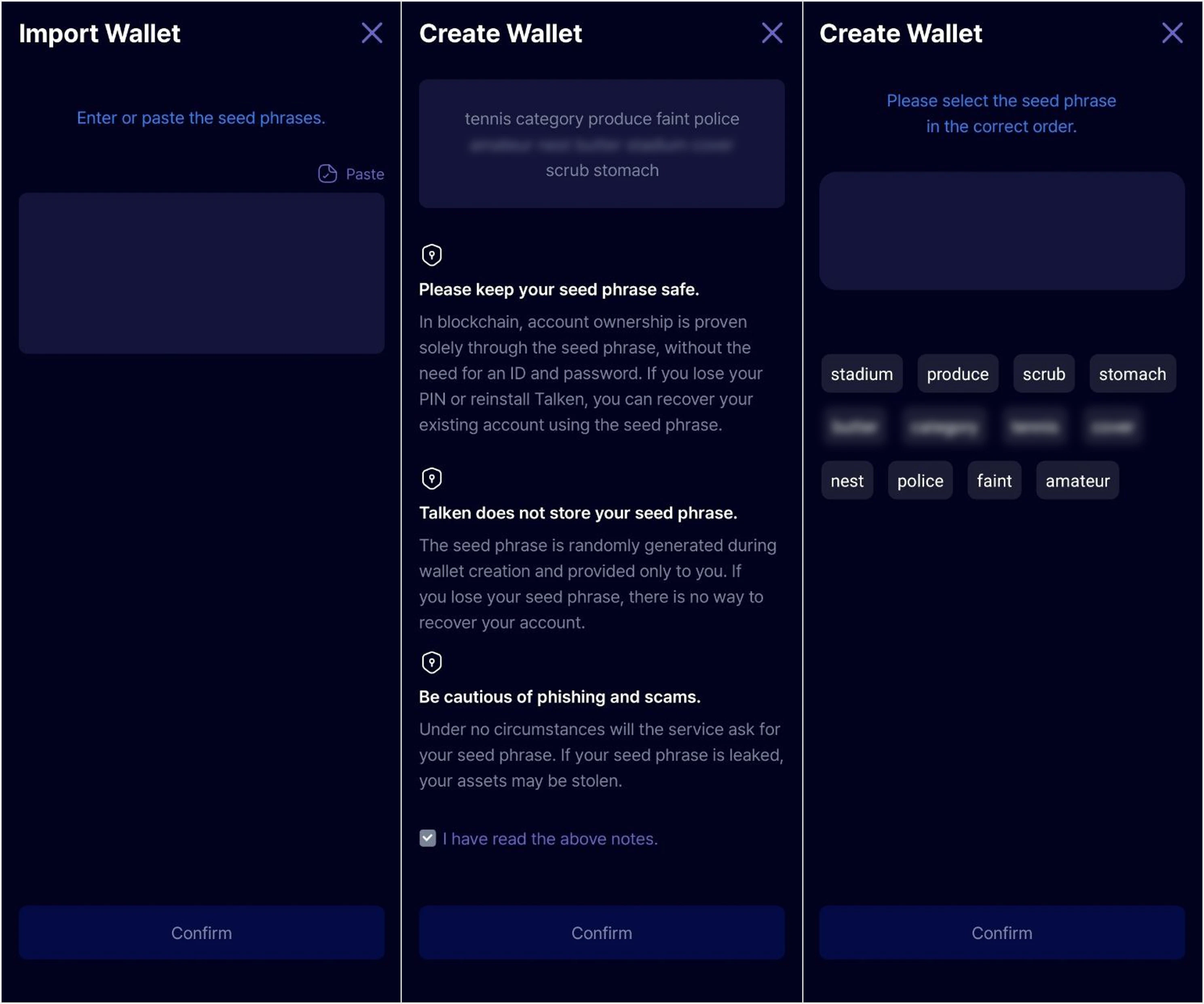
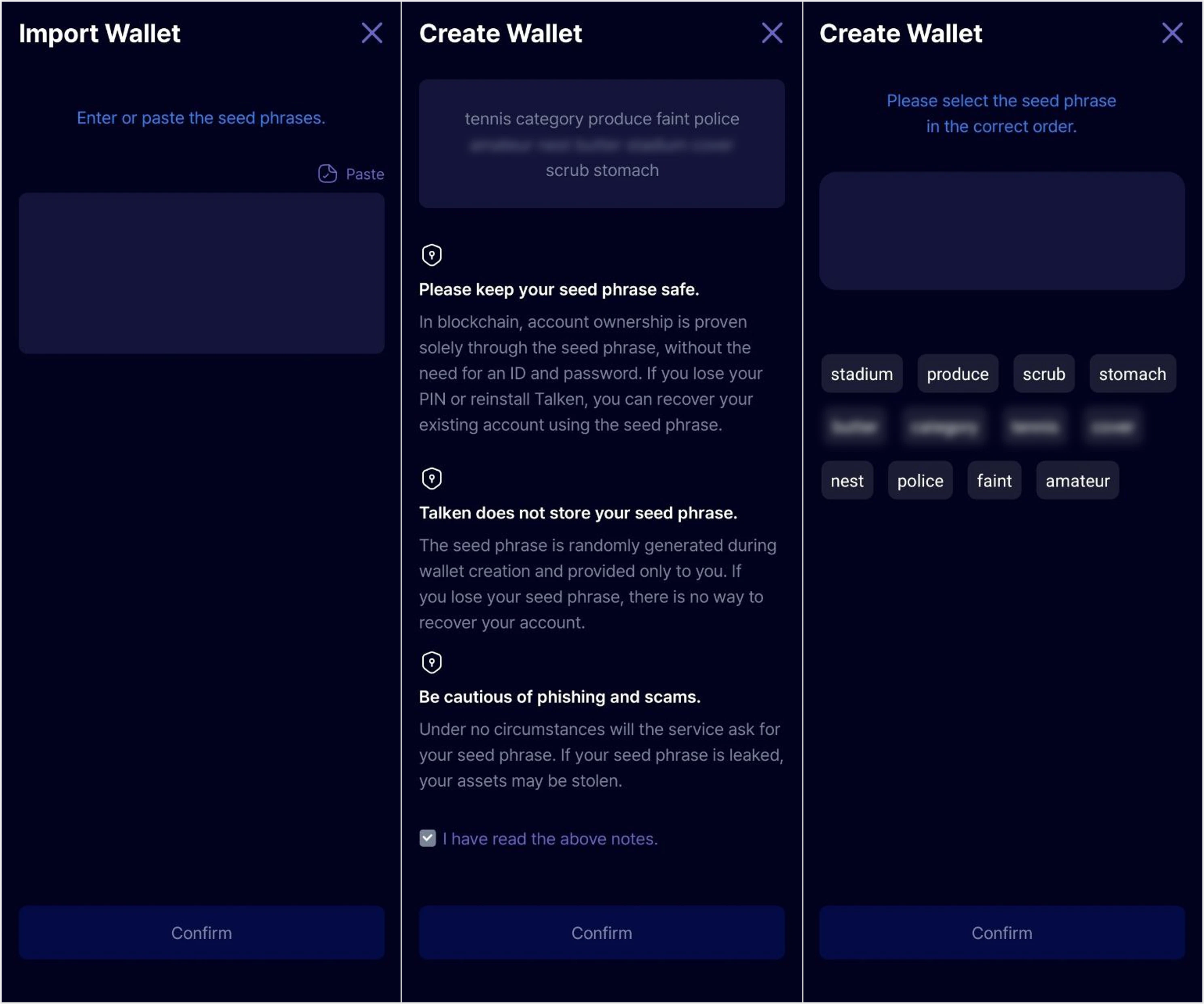
        Enter the 12-word Mnemonic (seed) phrase of the wallet you want to recover or your external wallet in the correct order. After entering the phrase, review the on-screen notice and proceed.

        <Frame>
          <img style={{maxWidth: '500px'}} src="https://mintcdn.com/talken-e05af0c7/qhdJqMcewoB2P5bb/images/%EA%B7%B8%EB%A6%BC8.png?fit=max&auto=format&n=qhdJqMcewoB2P5bb&q=85&s=61850f328e321426c61c6d89de9999de" className="dark:hidden" width="2978" height="2483" data-path="images/그림8.png" />

          <img style={{maxWidth: '500px'}} src="https://mintcdn.com/talken-e05af0c7/qhdJqMcewoB2P5bb/images/%EA%B7%B8%EB%A6%BC8-1.png?fit=max&auto=format&n=qhdJqMcewoB2P5bb&q=85&s=64a6fe9731d543d81320bdd3cbdfc265" className="hidden dark:block" width="2978" height="2483" data-path="images/그림8-1.png" />
        </Frame>

        <Warning>
          **The seed phrase is randomly created when you create a wallet and is provided only to you.** If you lose your seed phrase, there is no way to recover your account. Please write it down on paper and keep it safe.
        </Warning>

        <Note>
          Mnemonic phrases consist of 12, 15, 18, 21, or 24 words. Registration will fail if the format is incorrect.
        </Note>
      </Step>

      <Step title="Registration/Recovery Complete">
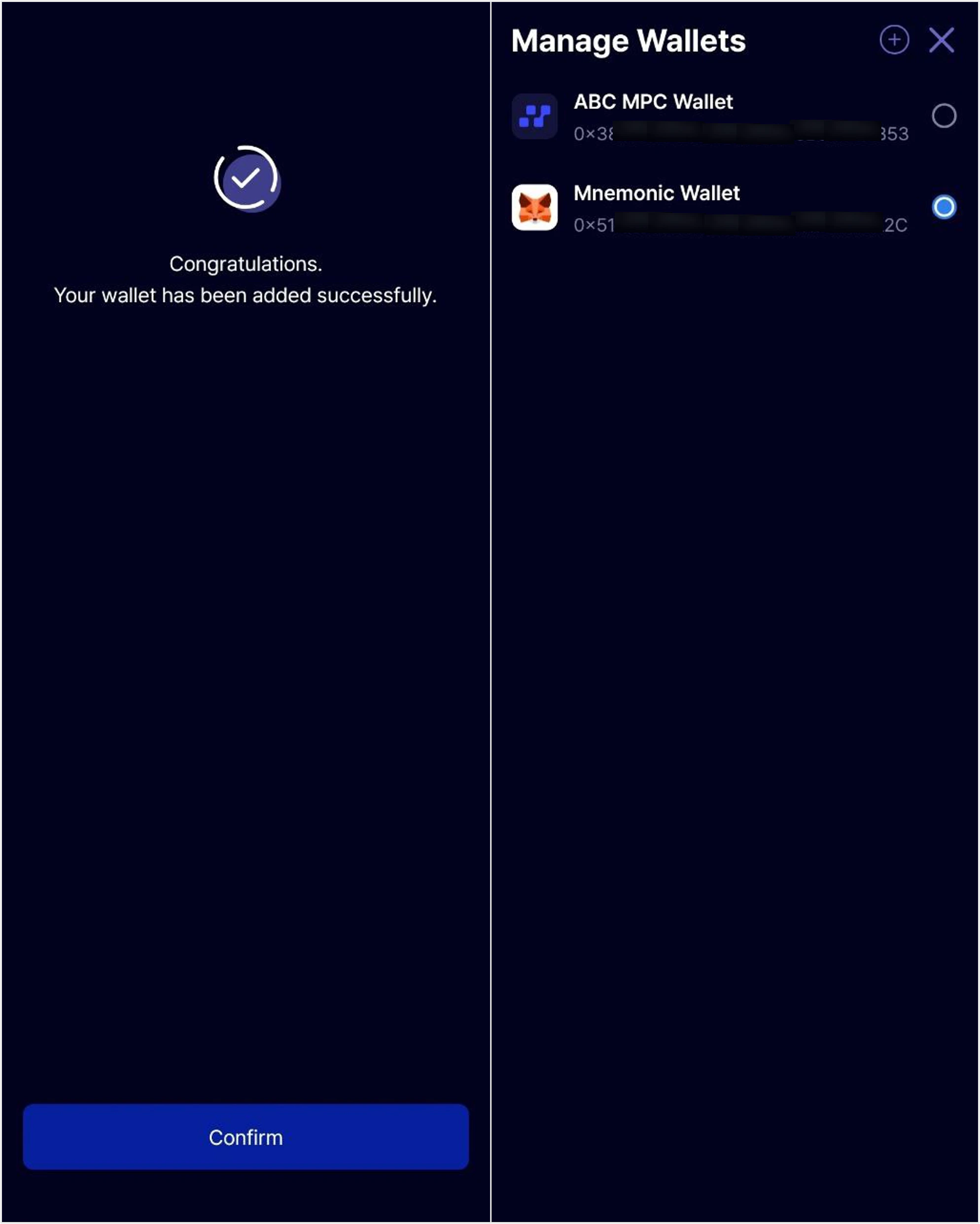
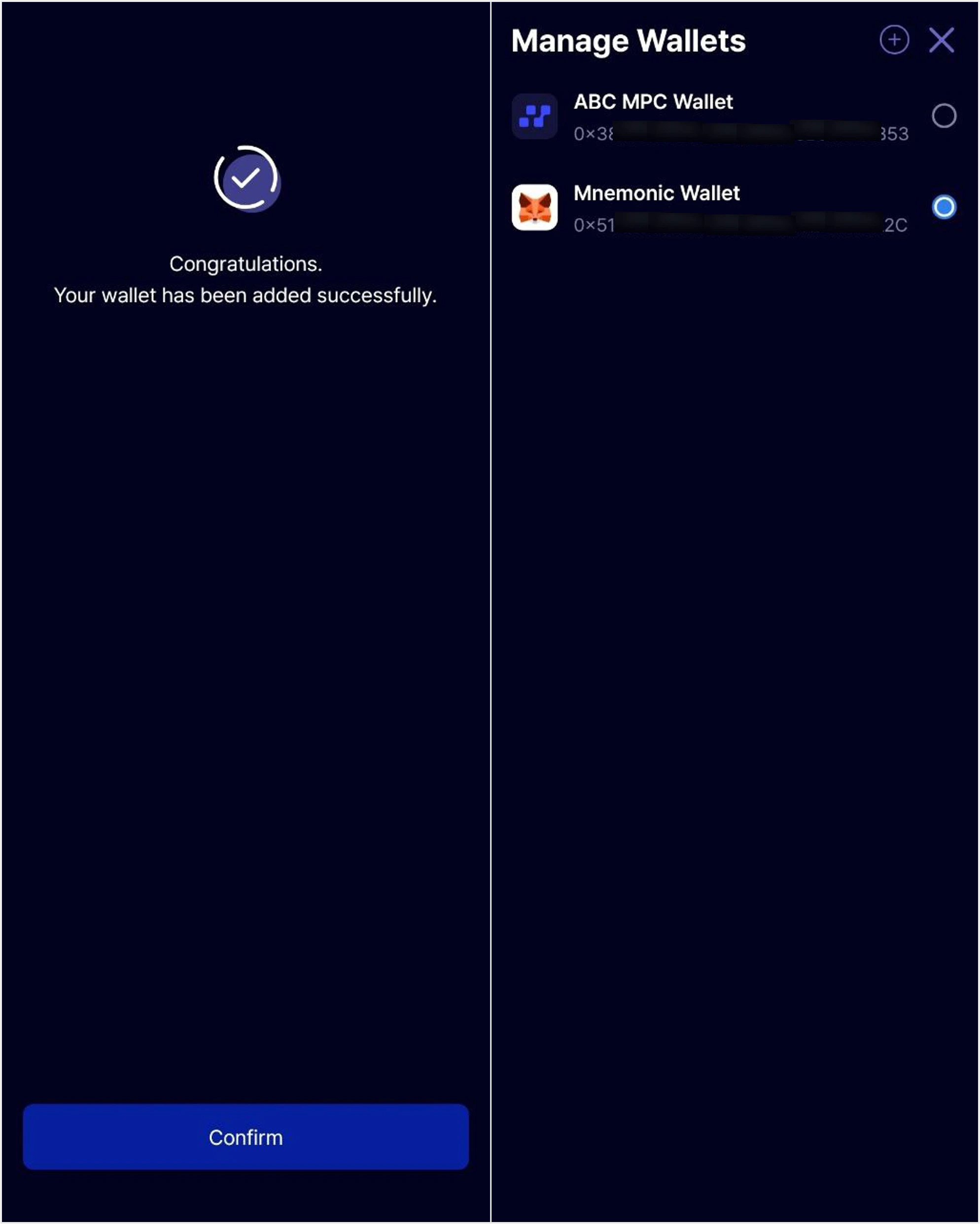
        Wallet recovery is complete. You can now use both **Mnemonic Wallet** and **ABC MPC Wallet** through the 'Manage Wallet' feature in the Talken app.

        <Frame>
          <img style={{maxWidth: '500px'}} src="https://mintcdn.com/talken-e05af0c7/qhdJqMcewoB2P5bb/images/%EA%B7%B8%EB%A6%BC9.png?fit=max&auto=format&n=qhdJqMcewoB2P5bb&q=85&s=d97e77c97e714f92ba6fe3bd8c0920a1" className="dark:hidden" width="1988" height="2483" data-path="images/그림9.png" />

          <img style={{maxWidth: '500px'}} src="https://mintcdn.com/talken-e05af0c7/qhdJqMcewoB2P5bb/images/%EA%B7%B8%EB%A6%BC9-1.png?fit=max&auto=format&n=qhdJqMcewoB2P5bb&q=85&s=d85afe4ef9ac9803fb54869bc527af5a" className="hidden dark:block" width="1988" height="2483" data-path="images/그림9-1.png" />
        </Frame>
      </Step>
    </Steps>
  </Tab>
</Tabs>